Cocos 接入穿山甲广告 SDK
在这个教程中,我将详细介绍如何在 Cocos 引擎中接入穿山甲广告 SDK。我们将分步介绍如何在 Cocos 项目中集成穿山甲Android SDK,包括环境配置、代码实现和测试等内容。
目录
前提条件
在开始之前,请确保你具备以下条件:
- 已安装 Cocos Creator 或 Cocos2d-x。
- 已创建一个 Cocos 项目。
注意事项:
-
由于Android平台更新迭代非常快,开发者很容易陷入版本冲突以及兼容问题,若要使用该教程,请使用推荐的的版本配置:
- Gradle:8.0.2
- Gradle Plugin:8.0.2
- Android NDK: 21.3.6528147
- Android SDK: 29
- Cocos Creator: 2.4.13
获取穿山甲 SDK
- 访问穿山甲官网:前往 穿山甲 并登录你的账户。
- 下载 SDK:在开发者中心找到Android SDK,下载并解压缩。

集成 SDK
1. 集成 Android SDK
-
导入 SDK 文件:
- 将下载的 Android SDK 文件(
.aar或.jar文件)放入 Cocos 项目的assets目录下的Plugins/Android文件夹中。
- 将下载的 Android SDK 文件(
-
配置 Gradle 文件:
- 打开 Cocos 项目的
proj.android-studio/app/build.gradle文件。 - 在
dependencies部分添加穿山甲 SDK 的依赖:
implementation 'com.android.support:appcompat-v7:28.0.0' //融合基础包,必须引入 implementation "com.pangle.cn:mediation-sdk:6.2.1.7" implementation "com.alibaba:fastjson:1.2.83" - 打开 Cocos 项目的
-
更新 AndroidManifest.xml:
-
在
proj.android-studio/app/src/main/AndroidManifest.xml中添加穿山甲所需的权限和服务:xml <uses-permission android:name="android.permission.INTERNET"/> <uses-permission android:name="android.permission.ACCESS_NETWORK_STATE"/> <uses-permission android:name="android.permission.ACCESS_WIFI_STATE"/> <!-- 所需权限 --> <uses-permission android:name="android.permission.INTERNET" /> <uses-permission android:name="android.permission.ACCESS_NETWORK_STATE" /> <uses-permission android:name="android.permission.WRITE_EXTERNAL_STORAGE" /> <uses-permission android:name="android.permission.READ_EXTERNAL_STORAGE" /> <uses-permission android:name="android.permission.REQUEST_INSTALL_PACKAGES" /> <uses-permission android:name="android.permission.READ_PHONE_STATE" />application部分: ```xml<activity android:name="org.cocos2dx.javascript.AppActivity" android:screenOrientation="portrait" android:configChanges="orientation|keyboardHidden|screenSize|screenLayout|uiMode" android:label="@string/app_name" android:theme="@android:style/Theme.NoTitleBar.Fullscreen" android:launchMode="singleTask" android:exported="true"> <intent-filter> <action android:name="android.intent.action.MAIN" /> <category android:name="android.intent.category.LAUNCHER" /> </intent-filter> </activity> <!-- 穿山甲 start================== --> <provider android:name="com.bytedance.sdk.openadsdk.TTFileProvider" android:authorities="${applicationId}.TTFileProvider" android:exported="false" android:grantUriPermissions="true"> <meta-data android:name="android.support.FILE_PROVIDER_PATHS" android:resource="@xml/file_paths" /> </provider> <provider android:name="com.bytedance.sdk.openadsdk.multipro.TTMultiProvider" android:authorities="${applicationId}.TTMultiProvider" android:exported="false" /> <!-- 穿山甲 end================== --> </application> ```4.添加xml文件: 在res目录下添加文件file_paths.xml
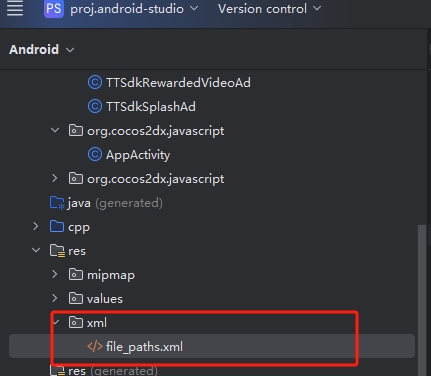
-
<?xml version="1.0" encoding="utf-8"?>
<paths>
    <external-path name="tt_external_root" path="." />
    <external-path name="tt_external_download" path="Download" />
    <external-files-path name="tt_external_files_download" path="Download" />
    <files-path name="tt_internal_file_download" path="Download" />
    <cache-path name="tt_internal_cache_download" path="Download" />
</paths>- 创建广告处理类
结构如下,创建并放到任意包下:
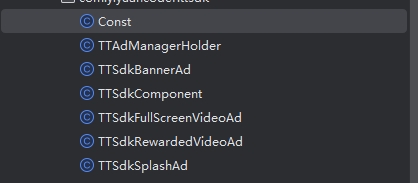
Const.java:
public class Const {
  public static String TAG = "TTSdkComponent";
}
TTAdManagerHolder.java:
public class TTAdManagerHolder {

  // 公共方法,封装了对私有方法的调用
  public void initialize(Context context, String appId) {
      initMediationAdSdk(context, appId);
      // 可以添加其他初始化逻辑或检查
  }

  //初始化聚合sdk
  private void initMediationAdSdk(Context context, String appId) {
      TTAdSdk.init(context, buildConfig(context, appId));
      TTAdSdk.start(new TTAdSdk.Callback() {
          @Override
          public void success() {
              System.out.println("初始化成功1");
              //初始化成功
              //在初始化成功回调之后进行广告加载"
//                JsbBridge.sendToScript("onInit", "true");
              // 一定要在 GL 线程中执行
              runOnGLThread(new Runnable() {
                  @Override
                  public void run() {
                      Cocos2dxJavascriptJavaBridge.evalString("Ad.onNative(\"onInit\", \"true\")");
                  }
              });
          }

          @Override
          public void fail(int i, String s) {
              //初始化失败
              System.out.println("初始化失败");
//                JsbBridge.sendToScript("onInit", "false");
              // 一定要在 GL 线程中执行
              runOnGLThread(new Runnable() {
                  @Override
                  public void run() {
                      Cocos2dxJavascriptJavaBridge.evalString("Ad.onNative(\"onInit\", \"false\")");
                  }
              });
          }
      });
  }

  private static TTAdConfig buildConfig(Context context, String appId) {

      return new TTAdConfig.Builder()
              /**
               * 注:需要替换成在媒体平台申请的appID ,切勿直接复制
               */
              .appId(appId)
              .appName("APP测试媒体")
              /**
               * 上线前需要关闭debug开关,否则会影响性能
               */
              .debug(false)
              /**
               * 使用聚合功能此开关必须设置为true,默认为false
               */
              .useMediation(true)
//                .customController(getTTCustomController()) //如果您需要设置隐私策略请参考该api
//                .setMediationConfig(new MediationConfig.Builder() //可设置聚合特有参数详细设置请参考该api
//                        .setMediationConfigUserInfoForSegment(getUserInfoForSegment())//如果您需要配置流量分组信息请参考该api
//                        .build())
              .build();
  }
}
TTSdkBannerAd.java:
public class TTSdkBannerAd {
  TTAdNative adNativeLoader;
  AdSlot adSlot;
  TTNativeExpressAd mBannerAd;
  FrameLayout mBannerContainer;
  Activity activity;
  float left, top;

  public TTSdkBannerAd(Activity activity, String codeId, float left, float top, int width, int height) {
      activity = activity;
      this.left = left;
      this.top = top;
      adNativeLoader = TTAdSdk.getAdManager().createAdNative(activity);
      adSlot = new AdSlot.Builder()
              .setCodeId(codeId)
              .setImageAcceptedSize(width, height) // 单位px
              .build();
      mBannerContainer = (FrameLayout) activity.findViewById(android.R.id.content).getRootView();
  }

  private void loadBannerExpressAd() {
      adNativeLoader.loadBannerExpressAd(adSlot, new TTAdNative.NativeExpressAdListener() {
          @Override
          public void onError(int i, String s) {
              Log.d(Const.TAG, "banner load fail: errCode: " + i + ", errMsg: " + s);
          }

          @Override
          public void onNativeExpressAdLoad(List<TTNativeExpressAd> list) {
              if (list != null && list.size() > 0) {
                  Log.d(Const.TAG, "banner load success");
                  destroyBannerAd();
                  mBannerAd = list.get(0);
                  mBannerAd.setSlideIntervalTime(30 * 1000);
                  if (mBannerAd != null) {
                      showBannerAd();
                  }
              } else {
                  Log.d(Const.TAG, "banner load success, but list is null");
              }
          }
      });
  }

  public void showBannerAd() {
      if (mBannerAd != null) {
          mBannerAd.setExpressInteractionListener(new
                    TTNativeExpressAd.ExpressAdInteractionListener() {
                        @Override
                        public void onAdClicked(View view, int i) {
                            Log.d(Const.TAG, "banner clicked");
                        }

                        @Override
                        public void onAdShow(View view, int i) {
                            Log.d(Const.TAG, "banner showed");
                        }

                        @Override
                        public void onRenderFail(View view, String s, int i) {
                            Log.d(Const.TAG, "banner renderFail, errCode" + i + ", errMsg: " + s);
                        }

                        @Override
                        public void onRenderSuccess(View view, float v, float v1) {
                            Log.d(Const.TAG, "banner render success");
                        }
                    });
          mBannerAd.setDislikeCallback(activity, new
                  TTAdDislike.DislikeInteractionCallback() {
                      @Override
                      public void onShow() {
                      }

                      @Override
                      public void onSelected(int i, String s, boolean b) {
                          Log.d(Const.TAG, "banner closed");
                          destroyBannerAd();
                      }

                      @Override
                      public void onCancel() {
                      }
                  });
          View bannerView = mBannerAd.getExpressAdView();
          if (bannerView != null && mBannerContainer != null) {
              mBannerContainer.addView(bannerView);
              bannerView.setX(left);
              bannerView.setY(top);
          }
      } else {
//            Log.d(Const.TAG, "请先加载广告或等待广告加载完毕后再展示广告");
          loadBannerExpressAd();
      }
  }

  public void destroyBannerAd() {
      if (mBannerAd != null) {
          mBannerAd.destroy();
          mBannerAd = null;
      }
  }
}
TTSdkComponent.java:
public class TTSdkComponent {

    TTSdkBannerAd mTTBannerAd = null;
    TTSdkRewardedVideoAd mTTRewardedVideoAd = null;
    TTSdkFullScreenVideoAd mTTSdkFullScreenVideoAd = null;
    TTSdkSplashAd mTTSdkSplashAd = null;

    Activity activity;

    public static TTSdkComponent mTTSdkComponent;


    public TTSdkComponent(Activity activity) {
        this.activity = activity;
        TTSdkComponent.mTTSdkComponent = this;
    }

    public static void  sendToNative(String arg0, String arg1){
        Log.d(Const.TAG, "banner load success, but list is null" + arg0 +"?" +arg1);
        TTSdkComponent.mTTSdkComponent.onScript(arg0,arg1);
    }

    public  void onScript(String arg0, String arg1){
        JSONObject jsonObject = JSON.parseObject(arg1);
        Activity activity = this.activity;
        if (arg0.equals("showToast")) {
            String content = jsonObject.getString("content");
            activity.runOnUiThread(new Runnable() {
                @Override
                public void run() {
                    Toast.makeText(activity, content,
                            Toast.LENGTH_SHORT).show();
                }
            });
        } else if (arg0.equals("init")) {
            TTAdManagerHolder ttAdManagerHolder = new TTAdManagerHolder();
            String appId = jsonObject.getString("appId");
            ttAdManagerHolder.initialize(activity, appId);
        } else if (arg0.equals("showBannerAd")) {
            if (mTTBannerAd == null) {
                String codeId = jsonObject.getString("codeId");
                float left = jsonObject.getFloatValue("left");
                float top = jsonObject.getFloatValue("top");
                int width = jsonObject.getIntValue("width");
                int height = jsonObject.getIntValue("height");
                mTTBannerAd = new TTSdkBannerAd(activity, codeId, left, top, width, height);
            }
            if (mTTBannerAd != null) {
                boolean isShow = jsonObject.getBooleanValue("isShow");
                if (isShow) {
                    mTTBannerAd.showBannerAd();
                } else {
                    mTTBannerAd.destroyBannerAd();
                }
            }
        } else if (arg0.equals("showRewardVideoAd")) {
            if (mTTRewardedVideoAd == null) {
                String codeId = jsonObject.getString("codeId");
                mTTRewardedVideoAd = new TTSdkRewardedVideoAd(activity, codeId);
            }
            if (mTTRewardedVideoAd != null) {
                mTTRewardedVideoAd.showRewardVideoAd();
            }
        } else if (arg0.equals("showSplashAd")) {
            if (mTTSdkSplashAd == null) {
                String codeId = jsonObject.getString("codeId");
                int width = jsonObject.getIntValue("width");
                int height = jsonObject.getIntValue("height");
                mTTSdkSplashAd = new TTSdkSplashAd(activity, codeId, width, height);
            }
            mTTSdkSplashAd.showSplashAd(null);
        } else if (arg0.equals("showFullScreenVideoAd")) {
            if (mTTSdkFullScreenVideoAd == null) {
                String codeId = jsonObject.getString("codeId");
                mTTSdkFullScreenVideoAd = new TTSdkFullScreenVideoAd(activity, codeId);
            }
            mTTSdkFullScreenVideoAd.showFullScreenVideoAd();
        }
    }
}
TTSdkFullScreenVideoAd.java:
public class TTSdkFullScreenVideoAd {

    TTAdNative adNativeLoader;
    AdSlot adSlot;
    TTFullScreenVideoAd mTTFullScreenVideoAd;
    Activity activity;

    public TTSdkFullScreenVideoAd(Activity activity, String codeId) {
        this.activity = activity;
        adNativeLoader = TTAdSdk.getAdManager().createAdNative(activity);
        adSlot = new AdSlot.Builder()
                .setCodeId(codeId)
                .setOrientation(TTAdConstant.ORIENTATION_VERTICAL)//设置横竖屏方向
//                .setMediationAdSlot(new MediationAdSlot.Builder()
//                        .setMuted(true)//是否静音
//                        .setVolume(0.7f)//设置音量
//                        .setBidNotify(true)//竞价结果通知
//                        .build())
                .build();
    }

    public void loadFullScreenVideoAd(boolean isShow) {
        adNativeLoader.loadFullScreenVideoAd(adSlot, new TTAdNative.FullScreenVideoAdListener() {
            public void onError(int code, String message) {
                Log.d(Const.TAG, "InterstitialFull onError code = " + code + " msg = " + message);
            }

            public void onFullScreenVideoAdLoad(TTFullScreenVideoAd ad) {
                Log.d(Const.TAG, "InterstitialFull onFullScreenVideoLoaded");
                mTTFullScreenVideoAd = ad;
//                Log.d("sada",""+isShow);
                if (isShow) {
                    showFullScreenVideoAd();
                }
            }

            public void onFullScreenVideoCached() {
                Log.d(Const.TAG, "InterstitialFull onFullScreenVideoCached");
                Log.d("5785785727","57587575875");
            }

            public void onFullScreenVideoCached(TTFullScreenVideoAd ad) {
                Log.d("sasasdasd","sadasda");
                Log.d(Const.TAG, "InterstitialFull onFullScreenVideoCached");
                mTTFullScreenVideoAd = ad;
                if (isShow) {
                    showFullScreenVideoAd();
                }
            }
        });
    }

    public void showFullScreenVideoAd() {
//        Log.d("mm", ""+(mTTFullScreenVideoAd==null));
        if (mTTFullScreenVideoAd == null) {
            loadFullScreenVideoAd(true);
            return;
        }
        // 展示广告
        this.mTTFullScreenVideoAd.setFullScreenVideoAdInteractionListener(new TTFullScreenVideoAd.FullScreenVideoAdInteractionListener() {
            public void onAdShow() {
                Log.d(Const.TAG, "InterstitialFull onAdShow");
            }

            public void onAdVideoBarClick() {
                Log.d(Const.TAG, "InterstitialFull onAdVideoBarClick");
            }

            public void onAdClose() {
                Log.d(Const.TAG, "InterstitialFull onAdClose");
            }

            public void onVideoComplete() {
                Log.d(Const.TAG, "InterstitialFull onVideoComplete");
            }

            public void onSkippedVideo() {
                Log.d(Const.TAG, "InterstitialFull onSkippedVideo");
            }
        });
        this.mTTFullScreenVideoAd.showFullScreenVideoAd(activity);
        this.mTTFullScreenVideoAd = null;
    }
}
TTSdkRewardedVideoAd.java:
public class TTSdkRewardedVideoAd {
    TTAdNative adNativeLoader;
    AdSlot adSlot;
    TTRewardVideoAd mTTRewardVideoAd;
    Activity activity;
    public boolean mIsRewardValid;

    public TTSdkRewardedVideoAd(Activity activity, String codeId) {
        activity = activity;
        adNativeLoader = TTAdSdk.getAdManager().createAdNative(activity);
        adSlot = new AdSlot.Builder()
                .setCodeId(codeId)
                .setOrientation(TTAdConstant.VERTICAL)//横竖屏设置
//                .setMediationAdSlot(new MediationAdSlot
//                        .Builder()
//                        .setExtraObject(MediationConstant.ADN_PANGLE, "pangleRewardCustomData")//服务端奖励验证透传参数
//                        .setExtraObject(MediationConstant.ADN_GDT, "gdtRewardCustomData")
//                        .setExtraObject(MediationConstant.ADN_BAIDU, "baiduRewardCustomData")
//                        .build())
                .build();
    }

    private void loadRewardVideoAd(boolean isShow) {
        adNativeLoader.loadRewardVideoAd(adSlot, new TTAdNative.RewardVideoAdListener() {
            @Override
            public void onError(int i, String s) {
            }

            @Override
            public void onRewardVideoAdLoad(TTRewardVideoAd ttRewardVideoAd) {
                mTTRewardVideoAd = ttRewardVideoAd;
                if (isShow) {
                    showRewardVideoAd();
                }
            }

            @Override
            public void onRewardVideoCached() {

            }

            @Override
            public void onRewardVideoCached(TTRewardVideoAd ttRewardVideoAd) {
                mTTRewardVideoAd = ttRewardVideoAd;
                if (isShow) {
                    showRewardVideoAd();
                }
            }
        });
    }

    public void showRewardVideoAd() {
        mIsRewardValid = false;
        if (mTTRewardVideoAd == null) {
            loadRewardVideoAd(true);
            return;
        }
        mTTRewardVideoAd.setRewardAdInteractionListener(new TTRewardVideoAd.RewardAdInteractionListener() {
            @Override
            public void onAdShow() {
            }

            @Override
            public void onAdVideoBarClick() {
            }

            @Override
            public void onAdClose() {
//                JsbBridge.sendToScript("onRewardAdCallback", mIsRewardValid ? "true" : "false");
                // 一定要在 GL 线程中执行
                runOnGLThread(new Runnable() {
                    @Override
                    public void run() {
                        String success = mIsRewardValid ? "true" : "false";
                        Cocos2dxJavascriptJavaBridge.evalString("Ad.onNative(\"onRewardAdCallback\", \""+success+"\")");
                    }
                });
            }

            @Override
            public void onVideoComplete() {
            }

            @Override
            public void onVideoError() {
            }

            @Override
            //已废弃,请使用onRewardArrived方法
            public void onRewardVerify(boolean rewardVerify, int rewardAmount, String rewardName, int errorCode, String errorMsg) {
            }

            @Override
            public void onRewardArrived(boolean isRewardValid, int rewardType, Bundle extraInfo) {//奖励是否发放请依据isRewardValid
                // 当用户的观看行为满足了奖励条件
                mIsRewardValid = isRewardValid;
            }

            @Override
            public void onSkippedVideo() {
            }
        });
        mTTRewardVideoAd.showRewardVideoAd(activity);
        mTTRewardVideoAd = null;
    }
}
TTSdkSplashAd.java:
public class TTSdkSplashAd {

    TTAdNative adNativeLoader;
    AdSlot adSlot;
    Activity activity;
    FrameLayout mSplashContainer;
    CSJSplashAd mCsjSplashAd;

    public TTSdkSplashAd(Activity activity, String codeId, int width, int height) {
        activity = activity;
        adNativeLoader = TTAdSdk.getAdManager().createAdNative(activity);
        adSlot = new AdSlot.Builder()
                .setCodeId(codeId)
                .setImageAcceptedSize(width, height)//单位px
                .build();
        mSplashContainer = (FrameLayout) activity.findViewById(android.R.id.content).getRootView();
    }

    public void loadSplashAd(boolean isShow) {
        adNativeLoader.loadSplashAd(adSlot, new TTAdNative.CSJSplashAdListener() {
            @Override
            public void onSplashRenderSuccess(CSJSplashAd csjSplashAd) {
                Log.d("SplashAd","onSplashRenderSuccess");
                /** 渲染成功后,展示广告 */
                if (isShow)
                    showSplashAd(csjSplashAd);
            }


            @Override
            public void onSplashLoadSuccess(CSJSplashAd csjSplashAd) {
                Log.d("SplashAd","onSplashLoadSuccess");
            }

            @Override
            public void onSplashLoadFail(CSJAdError csjAdError) {
                Log.d("SplashAd","onSplashLoadFail:"+csjAdError.getMsg());
            }

            @Override
            public void onSplashRenderFail(CSJSplashAd csjSplashAd, CSJAdError csjAdError) {
                Log.d("SplashAd","onSplashRenderFail:"+csjAdError.getMsg());
            }
        }, 3500);
    }

    public void showSplashAd(CSJSplashAd csjSplashAd) {
        if (csjSplashAd == null) {
            loadSplashAd(true);
            return;
        }
        csjSplashAd.setSplashAdListener(new CSJSplashAd.SplashAdListener() {
            @Override
            public void onSplashAdShow(CSJSplashAd csjSplashAd) {
            }

            @Override
            public void onSplashAdClick(CSJSplashAd csjSplashAd) {
            }

            @Override
            public void onSplashAdClose(CSJSplashAd csjSplashAd, int i) {
                // 广告关闭后,销毁广告页面
                finish();
            }
        });
        mCsjSplashAd = csjSplashAd;
        View splashView = csjSplashAd.getSplashView();
//        UIUtils.removeFromParent(splashView);
//        mSplashContainer.removeAllViews();
        mSplashContainer.addView(splashView);
    }

    public void finish() {
        if (mCsjSplashAd != null && mCsjSplashAd.getMediationManager() != null) {
            mSplashContainer.removeView(mCsjSplashAd.getSplashView());
            mCsjSplashAd.getMediationManager().destroy();
            mCsjSplashAd = null;
        }
    }
}- 初始化组件 在AppActivity初始化组件
public class AppActivity extends Cocos2dxActivity {

  @Override
  protected void onCreate(Bundle savedInstanceState) {
      super.onCreate(savedInstanceState);
      // DO OTHER INITIALIZATION BELOW
      SDKWrapper.getInstance().init(this);
      // 初始化组件
      new TTSdkComponent(this);
  }
}
至此安卓的初始化就完成了,穿山甲不愧是大平台,接入就是如此丝滑
配置穿山甲广告
1. 初始化 SDK
在 Cocos 项目的主脚本中,初始化穿山甲 SDK:
首先创建如下TS脚本,如果采用js请自行转换。
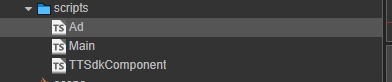 Ad.ts:
const { ccclass, property } = cc._decorator;

@ccclass("AdConfigBase")
class AdConfigBase {
    @property({ displayName: "广告Id" })
    codeId: string = "";
};

@ccclass("RewardedVideoAdConfig")
class RewardedVideoAdConfig extends AdConfigBase {
};

@ccclass("BannerAdConfig")
class BannerAdConfig extends AdConfigBase {
    @property({ displayName: "宽度" })
    width: number = 500;
    @property({ displayName: "高度" })
    height: number = 300;
};

@ccclass("InterstitialAdConfig")
class InterstitialAdConfig extends AdConfigBase {
};

@ccclass("SplashAdConfig")
class SplashAdConfig extends AdConfigBase {
};

@ccclass("Ad")
export class Ad {
    @property({ displayName: "应用appId" })
    appId: string = "";
    @property({ type: BannerAdConfig, displayName: "Banner广告" })
    bannerAdConfig: BannerAdConfig = new BannerAdConfig();
    @property({ type: RewardedVideoAdConfig, displayName: "激励视频广告" })
    rewardedVideoAdConfig: RewardedVideoAdConfig = new RewardedVideoAdConfig();
    @property({ type: SplashAdConfig, displayName: "开屏广告" })
    splashAdConfig: SplashAdConfig = new SplashAdConfig();
    @property({ type: InterstitialAdConfig, displayName: "插屏广告" })
    interstitialAdConfig: InterstitialAdConfig = new InterstitialAdConfig();

    private rewardAdCallback: any;
    private rewardAdCallbackObj: any;

    private static onNativeCallback: any;
    private static onNativeCallbackObj: any;

    sendToNative(arg0: string, arg1?: string) {
        // native.bridge.sendToNative(arg0, arg1);
        jsb.reflection.callStaticMethod("com/yiyuancoder/ttsdk/TTSdkComponent", "sendToNative", "(Ljava/lang/String;Ljava/lang/String;)V", arg0, arg1);
    }

    public static onNative(arg0: string, arg1: string) {
        if (this.onNativeCallback != null) {
            this.onNativeCallback.call(this.onNativeCallbackObj, arg0, arg1);
            this.onNativeCallback = null;
            this.onNativeCallbackObj = null;
        }
    }

    async init() {
        return new Promise((resolve, reject) => {
            // native.bridge.onNative = (arg0: string, arg1: string): void => {
            //     if (arg0 == 'onInit') {
            //         resolve(arg1 == "true");
            //     }
            // }
            Ad.onNativeCallbackObj = this;
            Ad.onNativeCallback = (arg0: string, arg1: string) => {
                if (arg0 == 'onInit') {
                    resolve(arg1 == "true");
                }
            }
            this.sendToNative("init", JSON.stringify({ appId: this.appId }));
        })
    }

    /**
    * 显示Banner广告
    */
    showBannerAd(show: boolean): void {

        let width = this.bannerAdConfig.width;
        let height = this.bannerAdConfig.height;
        let left = screen.width / 2 - width / 2;
        let top = screen.height - height;
        this.sendToNative("showBannerAd", JSON.stringify({ isShow: show, codeId: this.bannerAdConfig.codeId, left: left, top: top, width: width, height: height }));
    }

    /**
     * 播放激励视频广告
     */
    showRewardedVideoAd(rewardAdCallback: Function, rewardAdCallbackObj: any): void {
        this.rewardAdCallback = rewardAdCallback;
        this.rewardAdCallbackObj = rewardAdCallbackObj;

        let that = this;
        // native.bridge.onNative = (arg0: string, arg1: string): void => {
        //     if (arg0 == 'onRewardAdCallback') {
        //         that.onRewardAdCallback(arg1 == "true");
        //     }
        // }
        Ad.onNativeCallbackObj = this;
        Ad.onNativeCallback = (arg0: string, arg1: string) => {
            if (arg0 == 'onRewardAdCallback') {
                that.onRewardAdCallback(arg1 == "true");
            }
        }
        this.sendToNative("showRewardVideoAd", JSON.stringify({ codeId: this.rewardedVideoAdConfig.codeId }));
    }

    /**
     * 激励视频广告回调
     */
    onRewardAdCallback(success: boolean) {
        if (this.rewardAdCallback) {
            this.rewardAdCallback.call(this.rewardAdCallbackObj, success);
            this.rewardAdCallback = null;
            this.rewardAdCallbackObj = null;
        }
    }

    /**
     * 显示开屏广告
     */
    showSplashAd(): void {
        this.sendToNative("showSplashAd", JSON.stringify({ codeId: this.splashAdConfig.codeId, width: screen.width, height: screen.height }));
    }

    /**
     * 显示插屏广告
     */
    showFullScreenVideoAd() {
        // 在适合的场景显示插屏广告
        this.sendToNative("showFullScreenVideoAd", JSON.stringify({ codeId: this.interstitialAdConfig.codeId }));
    }
};

window.Ad = Ad;
TTSdkComponent.ts:
import { Ad } from "./Ad";

const { ccclass, property } = cc._decorator;

declare var wx: any;

@ccclass
export default class TTSdkComponent extends cc.Component {

    @property({ type: Ad, displayName: "广告模块" })
    ad: Ad = new Ad();

    sendToNative(arg0: string, arg1?: string) {
        jsb.reflection.callStaticMethod("com/yiyuancoder/ttsdk/TTSdkComponent", "sendToNative", "(Ljava/lang/String;Ljava/lang/String;)V", arg0, arg1);
    }

    showToast(content: string) {
        this.sendToNative('showToast', JSON.stringify({ content: content }));
    }
}
Main.ts:
//获取穿山甲Sdk组件
let ttSdkComponent = cc.find("TTSdkComponent").getComponent(TTSdkComponent);
//初始化
let inited = await ttSdkComponent.ad.init();
console.log(inited);
if (!inited) {
        ttSdkComponent.showToast("广告组件初始化失败");
        return;
}
以上Main.ts文件主要用于初始化脚本。
2. 挂载脚本
在你的cocos场景中新建节点,并挂载脚本文件:
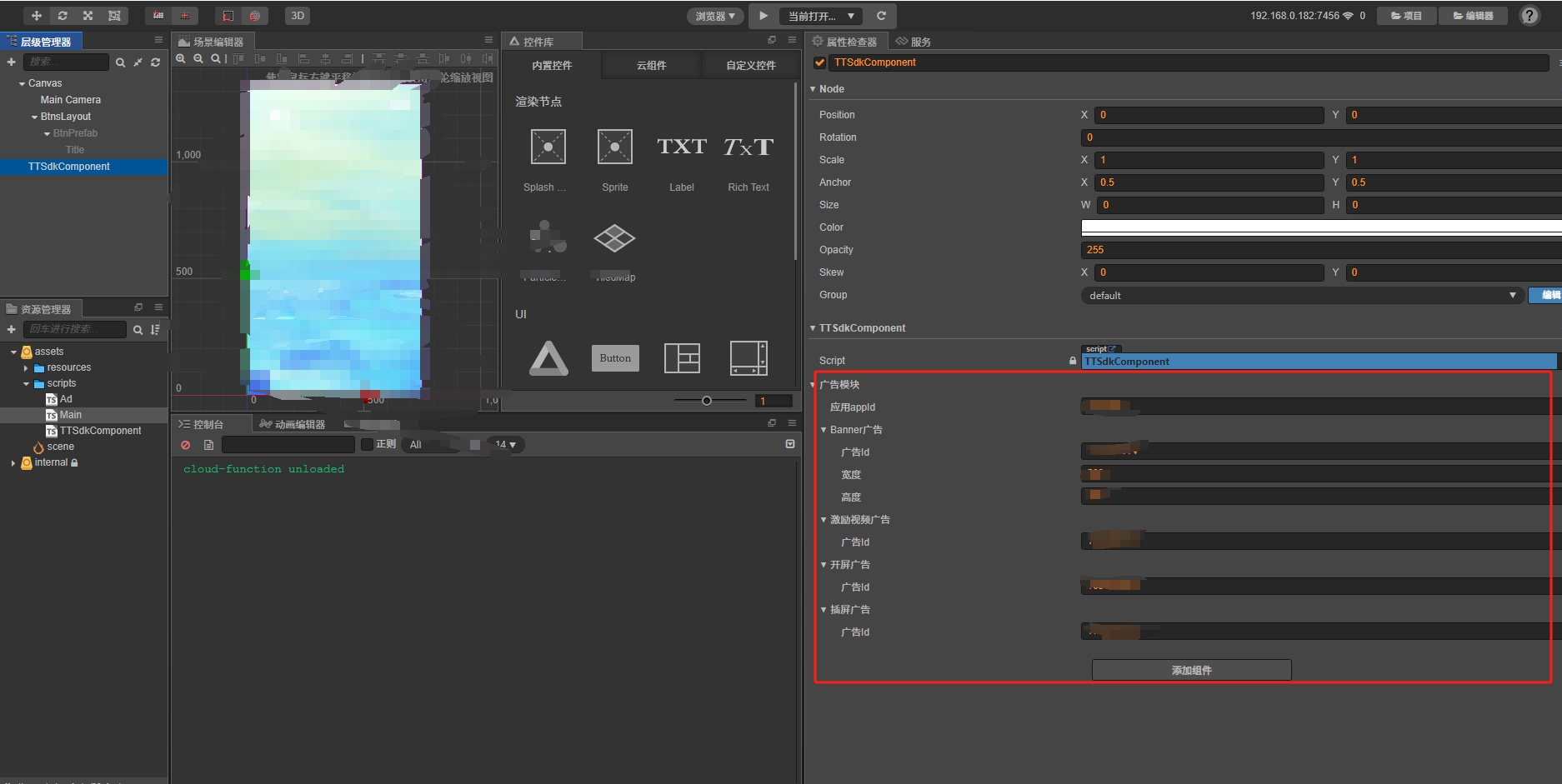 如上,填上你在平台申请的信息。
3. 调用广告
import TTSdkComponent from "./TTSdkComponent";
const { ccclass, property } = cc._decorator;


async start(){
  // banner
  ttSdkComponent.ad.showBannerAd(bannerAdFlag);
  // reward
  ttSdkComponent.ad.showRewardedVideoAd((success: boolean) => {
      ttSdkComponent.showToast(success ? "恭喜获得奖励" : "完整观看视频才能获得奖励哦");
  }, this);
  // 开屏
  ttSdkComponent.ad.showSplashAd();
  //插屏
  ttSdkComponent.ad.showFullScreenVideoAd();
}
以上仅为示例代码,在你的具体业务中请一定要初始化以后再调用方法。
至此你就可以接入穿山甲实现广告变现